jfreundJFNetworker
JFNetworker

Academy

Courses inside JFNetworker: read a lesson, try it in the simulator, check yourself with a quiz, then repair networks that someone broke. In English and German, installed with one click.

How a course works

A course has units, and each unit has steps. The outline shows every step as done, next or open, with your best result; Continue leads to the first open one. Your progress stays on your computer, even when a course is removed and installed again.

  • Lesson

    Text and pictures to read, in English and German. Done when you move on.

  • Lab

    A network in the simulator with a task: goals as a checklist and hints. Done when every goal is reached.

  • Quiz

    Practice. Every question has its own Check, the explanation comes at once, retries are free.

  • Test

    Says first what it asks for, then all questions, with a time limit if the author sets one. One hand-in per attempt, a pass mark.

  • Fault hunt

    A broken network with the helpers locked away. Repair it, name the culprit, hand in.

Questions can be single or multiple choice (with partial points), a text answer checked against patterns, a number with a tolerance, or things to put in order. The answers are controls of the app, so the solution does not stand in the page you read.

Labs the simulator checks

A lab opens as a project with the Task panel: what it is about, the goals as a checklist, and hints you reveal one at a time. The simulator checks the goals while you work, after every change and whenever a console shows its prompt again. A slim bar above the canvas names the step and the course and leads back to it.

Graded tasks give points per item: names, addresses and states of interfaces, VLANs, routes, cables, settings of services, lines of the running configuration and connection checks. The feedback comes per item, as a score only, or after handing in, with a time limit if you like. Teachers turn a finished network into a task with Tools › Create task.

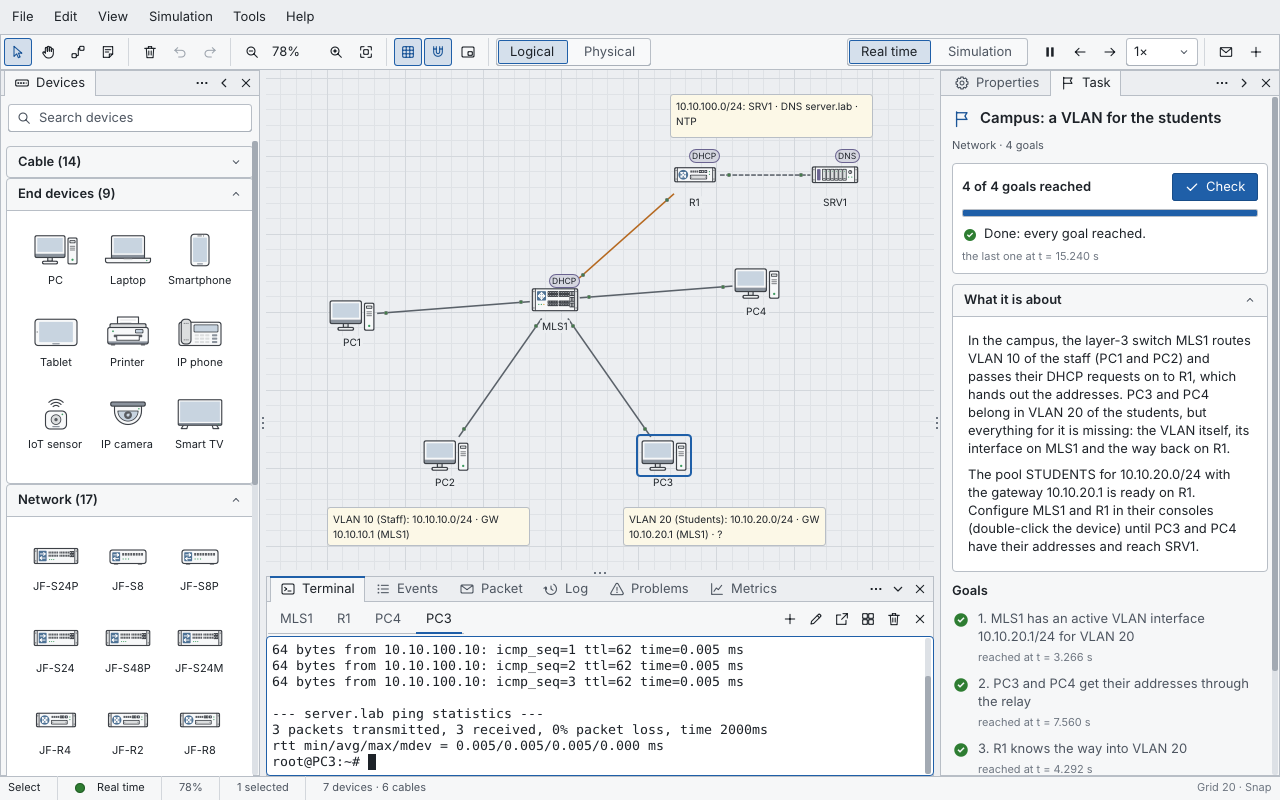
The lab “Campus: a VLAN for the students” in English: all four goals are reached, the console of PC3 shows a successful ping to the server, and the Task panel lists the goals with the time each was reached.

Fault hunts

A fault hunt starts with a network that does not work: a pulled cable, a device in the wrong VLAN, a name that does not resolve, a route that leads there but not back. The helpers that would give the answer away are locked: no problems list, no fault cards, no target network.

You repair it as you would a real one: replace the cable, switch the device off and on, start the stopped service, fix the configuration. Then you name the faulty device or cable and hand in. It is graded when you hand in, on the network as it is at that moment.

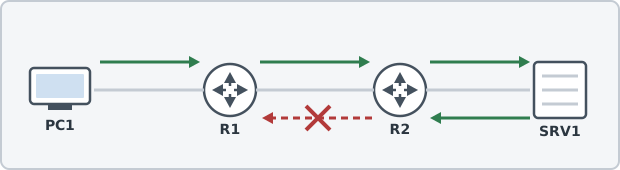
Drawing from a lesson: PC1 reaches the server SRV1 through the routers R1 and R2, but the way back from R2 is crossed out.
From the course Fault finding in networks: the way there works, the way back does not.

The courses

Two courses are ready, both in English and German. Install now takes both. Every step of both courses has a proof in the app's self-test, so a change to the simulator that breaks a lesson is caught.

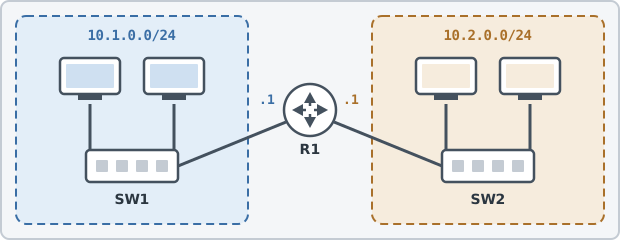
Drawing from a lesson: two networks, 10.1.0.0/24 and 10.2.0.0/24, each with a switch and two PCs, joined by the router R1.

Network basics

Beginner · 6 units · 24 steps · about 4 hours

From the cable to the name: hosts and switches, MAC and IP addresses, routers, DHCP and DNS. Each unit has lessons, a lab and a quiz, and the course ends with a lab on all of it and a test.

  1. The first network
    • LessonWhat a network is
    • LessonFrames and MAC addresses
    • LessonARP: from the IP to the MAC address
    • LabTwo PCs and a switch
    • QuizThe first network
  2. Addresses
    • LessonIPv4 addresses
    • LessonMask and prefix
    • LessonWho is in the same network?
    • LabA mask too narrow
    • QuizAddresses
  3. Router and gateway
    • LessonWhy two networks need a router
    • LessonThe default gateway
    • LessonThe routing table and traceroute
    • LabTwo networks, one router
    • QuizRouter and gateway
  4. DHCP
    • LessonDHCP: addresses that come by themselves
    • LabAddresses from the router
    • QuizDHCP
  5. DNS
    • LessonDNS: names for addresses
    • Lessondig: asking the name server
    • LabNames instead of numbers
    • QuizDNS
  6. All of it together
    • LabThe whole network
    • TestNetwork basics
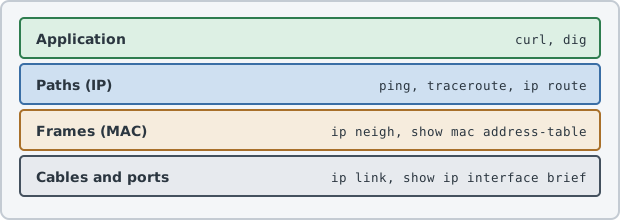
Drawing from a lesson: four layers from cables and ports up to the application, each with the commands that test it.

Fault finding in networks

Intermediate · 5 units · 20 steps · about 3 hours 20 minutes

A method instead of guessing: from the bottom up, narrowing down, one change at a time. Then eleven broken networks to repair, from a pulled cable to several faults against the clock.

  1. The method
    • LessonThink first, then type
    • LessonFrom the bottom up
    • LessonNarrowing down instead of searching everywhere
    • LessonWhat the outputs give away
    • LessonOne change, one test, one note
    • QuizThe method
  2. Cables and settings
    • Fault huntThe file server is gone
    • Fault huntPC2 is on its own
    • Fault huntOnly the outside does not work
    • Fault huntHalf of the clients
  3. What you do not see at once
    • Fault huntThe server that is not one
    • LessonA short reminder: VLANs
    • Fault huntIn the wrong VLAN
    • Fault huntThe way there works, the way back does not
  4. Services and quality
    • Fault huntBy address yes, by name no
    • LessonA short reminder: DHCP across a router
    • Fault huntNo address in the second network
    • Fault huntIt works, but slowly
  5. The real thing
    • Fault huntMonday morning (with a time limit)
    • TestFault finding

Installing a course

  1. Open the academy: on the start page under Learn, or with File › Academy….

  2. Click Install now. The first time, JFNetworker asks whether it may connect to raw.githubusercontent.com. It never connects on its own or at start-up.

  3. Every file is checked against its size and SHA-256 checksum. Only a complete, checked course replaces the old one; an interrupted download carries on next time.

  4. Installed courses work without a network. Update appears when a newer version is listed, and Uninstall keeps your progress.

Install from folder… takes a course from a folder, for authors and for computers without a network.

Said openly: a course is protected by GitHub's TLS and the checksums of its course list, not by a signature. Courses cannot run anything outside the simulator. The solutions of tests can be read in the course files: good for learning on your own, not a secure exam.

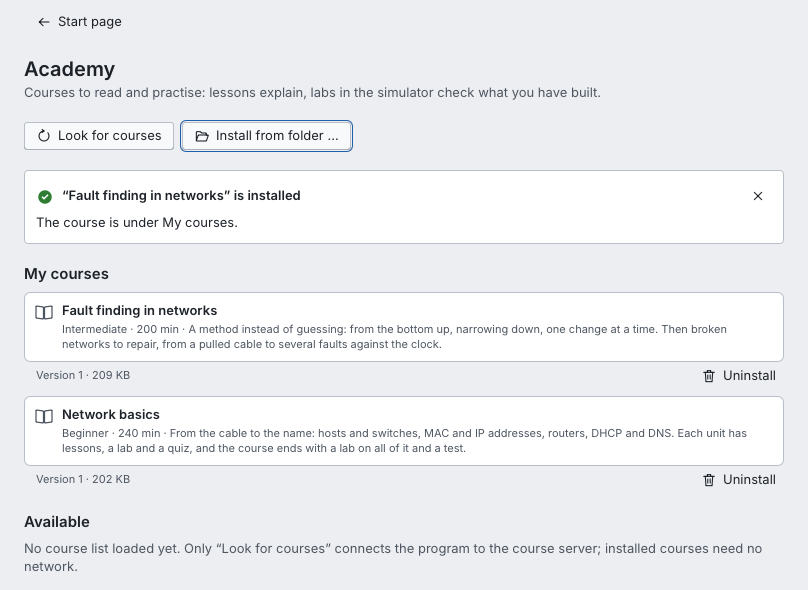
The academy page in the app: Look for courses and Install from folder at the top, a note that a course is installed, both courses under My courses with version, size and Uninstall, and Available still without a course list.
Both courses installed. Available lists what a course list offers once it is loaded.

Writing a course

A course is a folder of plain files. Lessons are Markdown, each in English and German; pictures come from the course folder, and links like step:ID and lab:ID lead to another step. Labs and fault hunts are .jfnet projects with a lab section: goals and hints, or for a fault hunt the graded items, the faults at the start and the locks. Quizzes and tests are JSON files with both languages side by side.

  • jfn-sim course FOLDER checks a course and names every problem: lessons in each language, pictures, links, quizzes, labs
  • JFNetworker --academy-dir FOLDER shows it in the app, without touching your own courses
  • tools/academy_index.py writes the course list with the checksums
  • A course source is a folder, or an address on raw.githubusercontent.com, with an index.json and the course folders below it
academy/
index.json             the course list, with checksums
<course>/course.json   units and steps
<course>/en/*.md       lessons in English
<course>/de/*.md       lessons in German
<course>/labs/*.jfnet  labs and fault hunts
<course>/quiz/*.json   quizzes and tests
<course>/img/*         pictures
course.json
{
  "format": "jfn-course", "version": 1,
  "course_version": 1,
  "title": ["Beispielkurs: das erste Netz",
            "Sample course: your first network"],
  "level": "beginner", "minutes": 15,
  "units": [
    { "title": ["Grundlagen", "The basics"],
      "steps": [
        { "id": "netz", "kind": "lesson",
          "title": ["Was ist ein Netz?",
                    "What is a network?"],
          "file": "01-netz.md" },
        { "id": "erstes-netz", "kind": "lab",
          "title": ["PC2 braucht eine Adresse",
                    "PC2 needs an address"],
          "file": "labs/erstes-netz.jfnet" }
      ] }
  ]
}
Part of jfreund.orgBuilt with JFLibLegal noticePrivacy